How to ReWire Live with Digital Performer 3.11
Using Live, you can quickly integrate audio loops and samples into your Digital Performer 3.11 projects. This is done by ReWiring Live with DP3.
Install Live on your computer. If you do not have Live yet, you can download the Live demo.
If you have not used Live yet, please launch Live so that it can install its ReWire engine in your system.
Quit Live.
Launch DP3.
Go to the DP3 Tracks Mini-Menu and add an Aux Track to your DP3 Project.
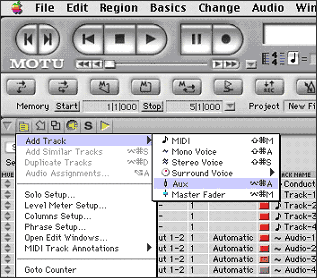
Note: The Aux Track enables ReWire to make the connection between Live and DP3.
Choose Live as a New Mono/Stereo Bundle in the DP3 Aux Track input section.
Launch Live.
Select the desired ReWire Bus in Live's Output menu.
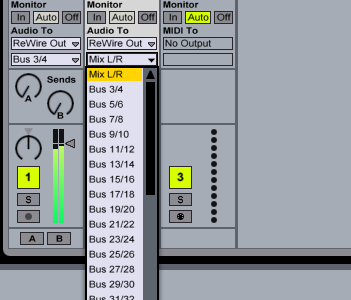
Notes:
- Live is now in ReWire Slave mode; DP3 is the ReWire Master.
- Live will lock to the DP3 tempo and transport with sample-accurate synchronization. If you change the tempo in DP3, Live will follow.
- You can record the Live ReWire input in DP3 by selecting Live as the input and record as usual with any other input.
- To disconnect the ReWire connection you must always quit Live first.