How to ReWire Live with Logic Pro
Using Live, you can quickly integrate audio loops and samples into your Logic projects. This is done by ReWiring Live with Logic Pro.
Install Live on your computer. If you do not have Live yet, you can download the Live demo.
If you have not used Live yet, please launch Live so that it can install its ReWire engine in your system.
Quit Live.
Launch Logic Pro.
Select a ReWire Channel in one or more of Logic's Audio Objects.
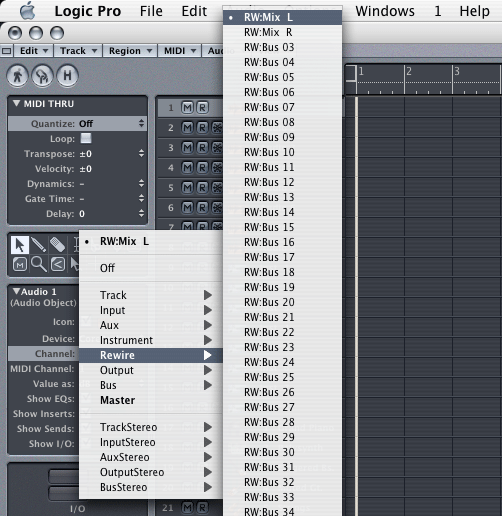
Note: If you have Reason or another ReWire application installed, please be sure you are selecting one of Live's sixteen ReWire channels and not another ReWire application's channels. Live usually appears first in the list.
Launch Live.
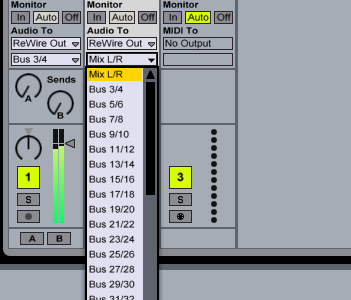
Select the desired ReWire Bus in Live's Output menu.
Hinweise:
- Live is now in ReWire Slave mode; Logic is the ReWire Master.
- Live will lock to the Logic tempo and transport with sample-accurate synchronization. If you change the tempo in Logic, Live will follow.
- You can bounce the Live ReWire input in Logic to disk by selecting the "BNCE" button in Logic's mixer on the main output 1-2 channel.
- Only Audio can be passed from Live to Logic in ReWire mode, not MIDI.
- To disconnect the ReWire connection you must always quit Live first.